

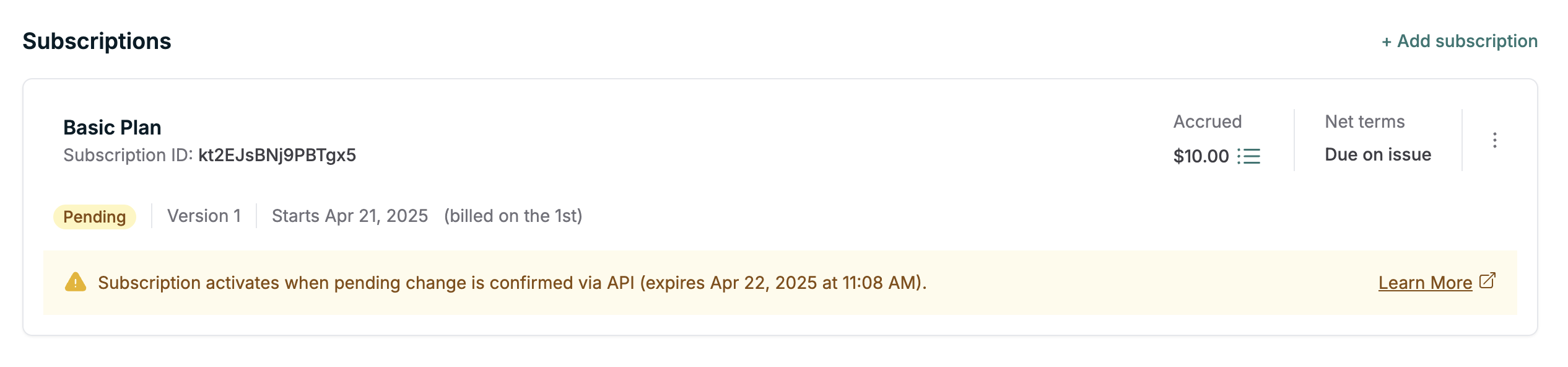
Orb’s Pending Changes feature lets you stage a subscription change—like creating a new subscription or editing an existing one—without applying it immediately. This gives you full control over when the change takes effect, usually after payment is collected or other validation is complete. This makes it possible to persist subscription changes in Orb without applying them, giving you access to the full power of Orb’s billing model—including invoice generation and change tracking—even before you commit to a subscription. That means you can use pending changes to power your application’s billing UI or confirmation flows in out-of-band workflows, such as signup experiences or manual payment collection flows. It’s especially useful for powering checkout flows, where you want to preview charges, collect payment, and only then commit to the subscription or mutation. You’d use a pending change instead of creating a subscription directly when:Documentation Index
Fetch the complete documentation index at: https://docs.withorb.com/llms.txt
Use this file to discover all available pages before exploring further.
- You want to treat the subscription as unentitled until payment is confirmed.
- You need to control the first payment flow yourself, especially if you don’t want Orb to immediately issue a fixed fee invoice.
- You want to show your user an invoice preview before creating the subscription — which makes this ideal for powering checkout flows.
- These benefits apply both to creating new subscriptions and mutating existing ones.
Example use case: Checkout flow
- Backend calls
POST /subscriptionswith headerCreate-Pending-Subscription-Change: true - Orb returns the subscription preview and a
pending_subscription_changeID - Backend uses the invoice preview to create a PaymentIntent with Stripe
- Frontend collects + confirms payment
- Backend calls
/subscription_changes/{id}/applyonce payment is successful, usually providing thepreviously_collected_amountto cover the initial invoice.
Usage
To stage a pending change, pass this header on any subscription mutation endpoint:- Create subscription
- Schedule plan change
- Trigger phase
- Update price quantity
- Update trial for subscription
- Add or edit price intervals — particularly useful for powering checkout flows with add-ons
- Return a
pending_subscription_changein the subscription response - Show the post-change state of the subscription (acts as a preview)
- Prevent further changes until this change is applied or canceled
You can only have one pending change at a time per subscription.
Follow-up actions
Once you’ve staged a change, use the following endpoints to manage it:Fetch the pending change
- View what will be changed
- Extract associated invoice amounts
- Display checkout UI to your user
Apply the change
You should explicitly pass either
mark_as_paid or previously_collected_amount when applying
a change if payment has been collected for the initial invoice(s) to ensure that the payment
is not collected twice.previously_collected_amount - Amount already collected externally (e.g., via Stripe, manual payment)
- This amount will be credited to the customer’s balance
- Helps avoid double-charging for amounts already collected in cases where mark_as_paid is not used
mark_as_paid - Boolean flag to mark all payable invoices as finalized and paid
- Use when you’ve collected payment externally and want to mark invoices as paid
- Only affects invoices where
is_payable_nowis true in the changed resources - Does not modify customer balance when used alone
- Mark all payable invoices as finalized and paid
- Calculate the difference:
previously_collected_amount- total_invoice_amount - Adjust the customer balance by this difference
Cancel the change
Expiration
Pending changes expire automatically after 1 day. This prevents abandoned sessions from blocking further changes.Previewing charges
The subscription returned when a pending change is staged reflects the intended state. To understand the associated invoices:- Inspect the
changed_resourcesfield on the subscription - Look at
created_invoices, which include both immediate and lookahead (upcoming beyond that) invoices - Use the
is_payable_nowfield on created invoices to identify which invoices need payment first. These will be invoices that are payable now with only in-advance fixed fee line items. You can use this field to determine which invoices should be paid to enable access to a subscription change (eg. plan upgrade).
Resources within
changed_resources are a preview of the invoicing changes that will be made.
After applying, you can expect the shape of newly created invoices to match except the id field, which is transient.- Identify the invoice to pay in your integration
- Validate invoice totals before confirmation
Using Include-Changed-Resources with pending changes
You can pass the Include-Changed-Resources header when creating a pending subscription change to control the changed resources included in the response.
For checkout flows, the payable_invoices mode is recommended:
is_payable_now is true, which is typically the information you need to determine upfront charges. This mode skips voided invoices, credit notes, and expensive metric recomputation, making it faster and more efficient for powering checkout UIs.
You can also pass Include-Changed-Resources: true to get the full set of changed resources (created and voided invoices, credit notes) for a pending change.
See Preview side effects for more details on the Include-Changed-Resources header.
Subscriptions with a pending change cannot be mutated again until the change is applied or canceled.
Additional behavior notes
- Pending changes can be used on existing subscriptions, not just new ones. This includes actions like plan changes or price updates. Just note that you cannot perform another mutation while a pending change exists.
- If you’re using pending changes to create a new subscription, you won’t be able to fetch it by ID until the change is applied.
- Pending subscriptions are skipped in migrations. They must be confirmed before they’re considered active.
- Pending subscriptions do not appear in data exports. This avoids polluting analytics or reporting pipelines with draft states.
- A new pending change is created
- A pending change expires
- A pending change is applied
- A pending change is canceled